
How to Find Phone Location by Number: Ultimate Tracking Guide
Have you ever had that sinking feeling when you can't reach someone and wonder where they are?
Whether it's your teenager running late, a misplaced phone, or a company device that’s gone rogue, figuring out how to find phone location by number feels like a tech-savvy superpower — but it’s a real, totally legal thing you can do (within limits, of course).
In this list, I'll break down the legitimate and reliable ways to track a phone’s location by number, without sketchy apps, outdated tricks, or privacy nightmares.
🔍 How to Legitimately Track a Phone by Number
Need to find someone’s location using just their phone number?
Whether it's to locate a lost phone, check on a loved one, or ensure a company device stays put, there are safe and legal ways to do it — no shady apps or hacking required.
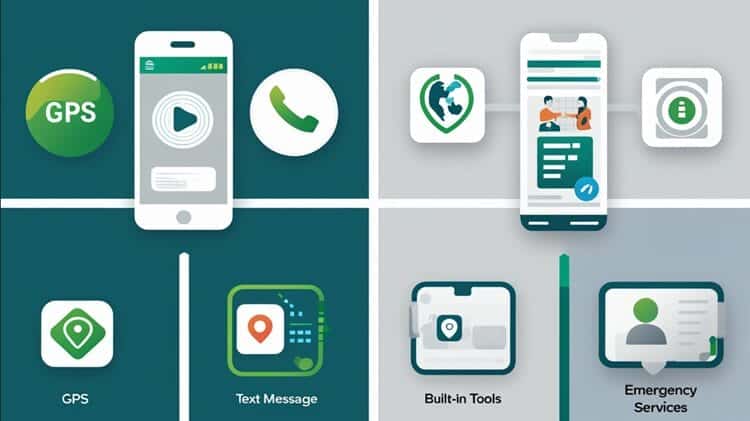
- Use GEOfinder to send a location request via text. When the recipient consents by tapping the link, their GPS location appears on your map — no app needed.
- Try Scannero for a quick, SMS-based tracking method with the option to customize the message. Ideal for recovering lost phones or checking in discreetly.
- Rely on free built-in tools like Apple's Find My (iOS) or Google’s Find My Device (Android) to track your own devices — just ensure location sharing is enabled beforehand.
- In emergencies, authorities can legally trace a phone using GPS or cell tower triangulation, but this requires official involvement.
- Important: Always get consent before tracking another person. Unauthorized tracking is illegal in most countries.
Ready to explore the safest tools and step-by-step strategies to track a phone by number?
Let’s dive in.👇
11 Legit Ways to Track & Find Phone Location by Number
1. Understand How Phone Location Tracking Actually Works
Before diving into tools, it’s helpful to know what’s going on behind the scenes.
Phone tracking by number usually works through GPS, cell tower triangulation, or Wi-Fi positioning.
Most tracking services access these methods with user consent and provide approximate locations based on signals.
Now, if the phone's turned off or out of range, things can get a little fuzzy. But tools today are super sophisticated and can even provide a last-known location in some cases.
If you're someone who gets stressed easily (like me when I thought my phone was lost, but it was in my fridge), knowing how this works makes it less scary.
2. Know What’s Legal (And What’s Not)

Here's the truth bomb: tracking someone’s phone without their consent is illegal in most countries.
There’s a clear distinction between legal vs illegal tracking.
Want to keep your kid safe?
Totally legal.
Want to track an ex without them knowing?
Not the best.
Many services require the person to approve location sharing or click a consent link.
If you're unsure, check the laws in your country. Always better to be safe.
3. Try GEOfinder to Locate a Phone Easily
GEOfinder is probably the easiest legit way to find phone location by number.
I’ve personally used it when one of my teenage nephews didn’t come home on time — turns out he had just fallen asleep at a friend’s place.
You don’t need to install anything on your or their phone. Just type in the number, and the person receives a text asking for location permission.
Once they click, boom — you’ve got their spot on a map.
It works with all mobile carriers and even does things like reverse phone lookup.
Highly accurate and user-friendly.
4. Use Scannero for Fast & Flexible Tracking
Scannero is another solid option.
This one sends a link via SMS, and when the person clicks it, you're emailed their precise location.
I’ve used this when I left my phone in an Uber. I sent myself a Scannero message, and whoever found my phone clicked it out of curiosity — I had it back within 30 minutes.
It’s especially helpful if the phone’s built-in tracking isn’t working.
Bonus: you can add a little personal message to encourage someone to return your lost phone.
5. Use Built-In Features on Smartphones
Both Android and iPhone have features meant for scenarios like losing your device. They’re free and reliable.
On iPhone, use “Find My”. Just sign in to iCloud from another device and get the GPS location.
On Android, it's “Find My Device.” Same process — log into your Google account and use the feature.
These tools require that location is enabled and the phone is online. I once turned off location to save battery… and wasn't happy with myself for doing that when I needed to track the phone later.
6. Contact Emergency Services for Critical Situations
In a real emergency — like a missing loved one or medical distress situation — authorities can use their own systems to track a device via network triangulation or GPS.
This isn’t something everyday folks can do, and there are strict protocols, but it’s good to know it’s an option.
Someone helped her neighbor when the neighbor's elderly dad went missing, and emergency services found him using this method.
This option requires serious situations and usually official police or court involvement.
7. Compare Tracking Tools Before You Commit
Every tracking tool out there has its pros and cons.
Here’s a quick cheat sheet to help you compare:
| Tool | Consent Needed? | How It Works |
|---|---|---|
| GEOfinder | Yes | Browser-based, GPS |
| Scannero | Yes | SMS link w/ GPS |
| Find My (Apple) | No (Same Apple ID) | iCloud/GPS |
| Google Find My Device | No (Login needed) | GPS |
Tip: Don’t rely on reviews alone. Try the trial options first. GEOfinder’s trial helped me determine if it worked for my needs.
8. Step-by-Step: How to Use GEOfinder Like a Pro
Here’s how I do it:
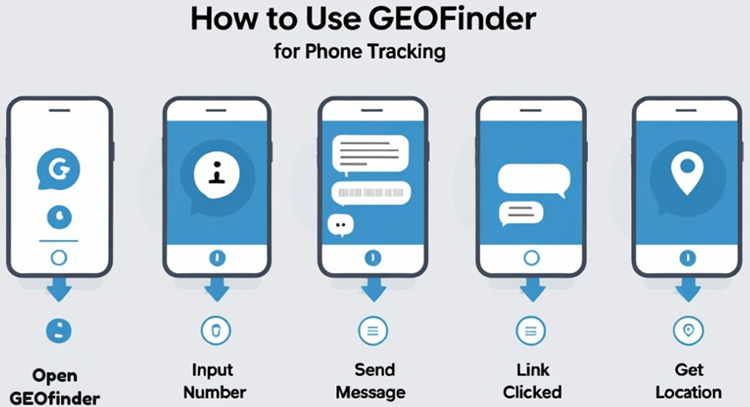
- Go to GEOfinder’s site
- Enter the phone number you want to track
- Choose a message (or write your own)
- Wait for them to click the link
- Receive the geo-location in your dashboard
It usually takes less than five minutes.
I tracked a friend on vacation once just to test — it worked like a charm. Just don’t forget: this only works if they click the message!
9. Send a Scannero Message to Their Device
If you want to track fast and give them a reason to click, this can be an emotional lifesaver.
- Go to Scannero
- Enter their phone number
- Customize text to sound urgent: “Hi! It's me. I lost your contact, can you click this?”
- When they click, you're notified
Perfect if your phone is lost and someone finds it, or if you’re trying to track a loved one.
Scannero finds phones in about two minutes, which is a lifesaver when minutes matter.
It also works well if you're stuck and can’t ping your phone using an app.
10. Be Aware of Privacy & Consent Laws
I always say this: just because you can do something doesn’t mean you should.
Tracking someone without permission?
Not cool.
Illegal in most countries, especially for non-guardians.
Consent is everything.
In Europe, GDPR governs this. In the U.S., some states require 2-party consent. So always double-check before you hit “track.”
To stay on the safe side, only use these tools for your kids, your own phones, or with clear approval.
11. Use These Methods for Everyday Emergencies
I’ve used tracking tools more times than I care to admit — mostly for losing my own phone in my house.
(Pro Tip: check under pillows!) In non-emergencies, tracking helps with:
- Lost phones
- Forgotten devices at restaurants or cabs
- Safety of kids and elderly family members
- Checking on late employees or deliveries for business
You can even combine methods — like using built-in phone features + texting yourself via Scannero.
It increases the odds.
Key TakeAway
Here’s a quick summary to help you remember the key points about tracking a phone by number:
- ❌ You can't legally track someone’s phone without their consent (unless it's your child).
- ⚡ A phone that's off or dead can still show its last known location.
- 🌍 Most tracking services work globally, as long as the device is connected to the internet.
- ✅ Free options like “Find My iPhone” and “Find My Device” work well for lost phones.
- 📩 Tools like GEOfinder & Scannero don’t require you to install anything—just send a link!
- 🔐 Always ask for permission and use tracking tools responsibly.
FAQs: How to Track & Find Phone Location by Number – Simple Guide
Here are some quick answers to the most common questions people have when trying to locate a phone by number:
Q1: Can I track a phone by number without them knowing?
Nope!
That’s not legal unless it’s your child and you’re their legal guardian. Most tools ask for permission through a text or app to keep things safe and private.
Q2: What if the phone is off or out of battery?
If the phone’s off, most tools can only show its last known location. So while you won’t get live tracking, it may give you a clue where to start looking.
Q3: Do these tracking tools work worldwide?
Yes!
Tools like GEOfinder and Scannero work with most global carriers. Just make sure the person has an internet connection when they receive the permission request.
Q4: Is there a free way to track my lost phone?
Definitely.
Use built-in tools like “Find My iPhone” or “Find My Device” on Android. Just log in with your account to see the phone’s location—no cost involved.
Q5: Do I need to install anything on their phone to track it?
Not with GEOfinder or Scannero!
You just send a message with a location link. Once they tap it, you get their location. No downloads or installs needed.
Final Thoughts: Be Smart, Safe & Respectful
Tracking a phone location by number doesn’t have to be sketchy or tech-heavy.
Whether you’re trying to keep your family safe or just find your own phone (again), there are tools and strategies available to help.
Use them wisely, stay legal, and next time panic sets in — remember this post. 😉
Start smart tracking now with GEOfinder or Scannero and never lose track again.


